For most of the last two decades "gaming setup" and "home office" were different rooms with different furniture. That's dead now. Most of us game from the same chair we spend eight hours in on client calls, and the chair has to survive both jobs without looking like a Fortnite fever dream when the camera turns on. The whole hybrid gaming/office chair category — Secretlab's Atlas, Corsair's TC100, and Cooler Master's Hybrid 1 — exists because of that exact problem: bucket-seat comfort and racing-chair adjustability, wrapped in something that doesn't scream "gamer" in a Teams thumbnail.
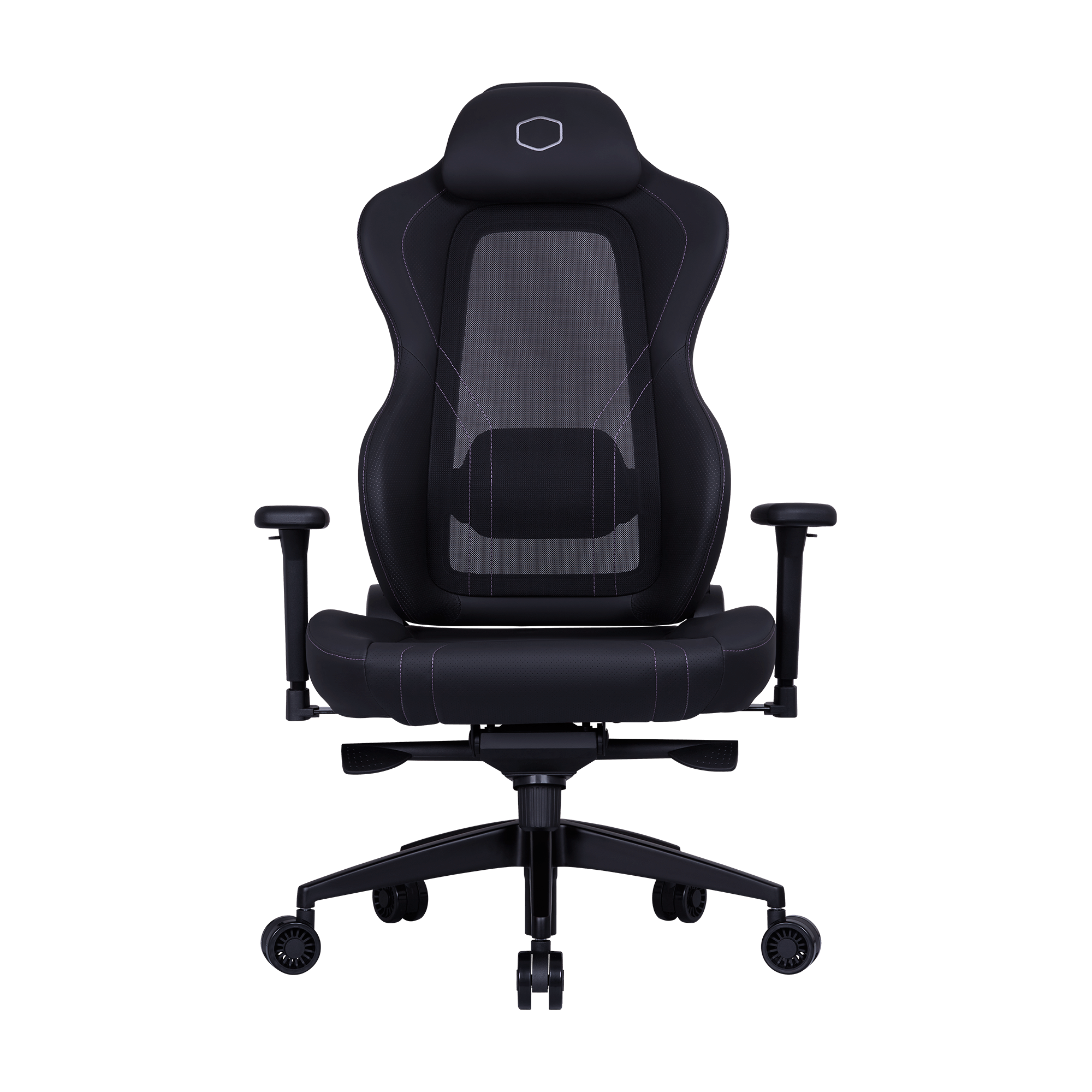
The Cooler Master Hybrid 1 ($449) is the centerpiece of this WFH-slash-gaming corner, and this is the build I'd actually recommend — not a wishlist, a real parts list with the reasoning behind every pick.
Why the Hybrid 1 Is the Right Centerpiece
The Hybrid 1 splits the difference on purpose. It keeps the wide, cold-molded foam bucket seat and racing-style wings that make a gaming chair feel like a gaming chair — good lateral support for the leaned-forward, elbows-on-desk posture you fall into during a clutch round. But the backrest swaps the usual PU leatherette for MuscleFlex breathable mesh with genuinely adjustable lumbar support, which is the part that actually matters for an 8-hour workday. Steel frame, aluminum base (not the nylon star base a lot of "gaming" chairs still ship with at this price), and a 180-degree recline for the rare occasion you need to lie flat between meetings.
The trade-off reviewers keep flagging is real: the leatherette-arm/mesh-back combo reads as a little visually disjointed rather than fully unified like the Atlas. I don't think it matters much on camera — from chest-up on a webcam, what you see is dark mesh and a clean headrest, not the seams. If a fully monochrome, zero-gaming-tell silhouette matters more to you than the money, that's the Atlas's whole pitch (see alternatives below).
The Parts List
Chair
- Cooler Master Hybrid 1 — $449. Adjustable 4D armrests, adjustable lumbar, breathable mesh back, 180° recline.
Desk
- Motorized sit-stand desk, 55–60" wide, dual-motor, minimum 220 lb rating. You want the width for a monitor arm plus a laptop dock and still have desk space left for a mouse mat that isn't hanging off the edge. Bamboo or laminate top in a neutral tone (light oak or matte black) reads as "office," not "gaming cave," on camera.
- Cable tray or under-desk basket — mandatory, not optional, if this desk is ever going to be in frame.
Monitor setup
- Primary: 27" 1440p 165Hz+ IPS panel on a monitor arm, not the stock stand. The arm is what actually sells the "this is a real desk" look and frees up depth for the webcam.
- Secondary (optional): a 24" 1080p panel angled ~30° off-axis for chat/Slack/Discord — keeps it out of the primary camera frame during calls but one glance away during a raid.
- Webcam: mount it on top of the primary monitor, eye-level, not on the laptop below it. This one change does more for "looks professional on video calls" than any lighting purchase.
Lighting
- One key light — a soft-box style panel light (not RGB strip) at 45° off your face, 5000-5600K daylight-balanced. This is what makes you look like a person on a call instead of a shadow with a headset.
- RGB strip behind the monitor/desk, bias-lighting style, kept off your face and out of camera range unless it's angled into frame deliberately — it's there for late-session gaming ambience, not for the 10am standup.
- Keep the RGB and the key light on separate switches or smart plugs so you can kill the gamer glow in one tap before a call.
Peripherals that don't clash
- Low-profile mechanical keyboard in a neutral colorway (black/white, not a rainbow shell) with quiet switches — audible clacking on a call gets old for everyone else fast.
- A mouse mat sized to cover the desk in front of keyboard+mouse in one piece, both to hide desk-surface scuffs on camera and to keep mouse movement smooth.
Dialing In the Room for Both Jobs
A few things worth flagging when you set this up:
- Chair height vs. desk height matters more than people think. Set the Hybrid 1 so your elbows are at roughly desk height with the armrests just touching the underside of the desk edge — that's the position that works for both typing all day and gripping a mouse for headshots without forearm fatigue.
- Camera framing hides the "gaming" tells for free. A webcam mounted at eye level on the primary monitor naturally frames out the RGB strip behind the desk and most of the chair's wings — you don't need to redecorate, just angle the shot.
- Recline is a workday feature too. The Hybrid 1's 180° recline isn't just for gaming breaks — a quick 15-minute flat-back reset between back-to-back calls is a legitimate ergonomics move, and it's the one thing a pure task chair like a Herman Miller Aeron won't give you.
Alternatives at Other Budgets
- Secretlab Atlas — the premium pick if you want zero visible "gaming chair" tells at all: it deliberately drops the bucket bolsters and racing wings for a cleaner office silhouette. Pricier, and reviewers note it's a noticeably worse gaming chair for it — you're trading lateral support for looking sharp on Zoom.
- Corsair TC100 Relaxed — the budget hybrid. Understated enough not to draw attention on a call with the boss, genuinely comfortable for late-night sessions, and consistently ranked as the best budget option in the category. If $449 is a stretch, start here and upgrade later.
The point of a hybrid setup isn't finding gear that's mediocre at both jobs — it's finding gear that doesn't force you to choose. The Hybrid 1 at the center of this build does that: it's a real gaming chair with real task-chair ergonomics, on a desk that photographs like an office and games like a battlestation once the call ends.