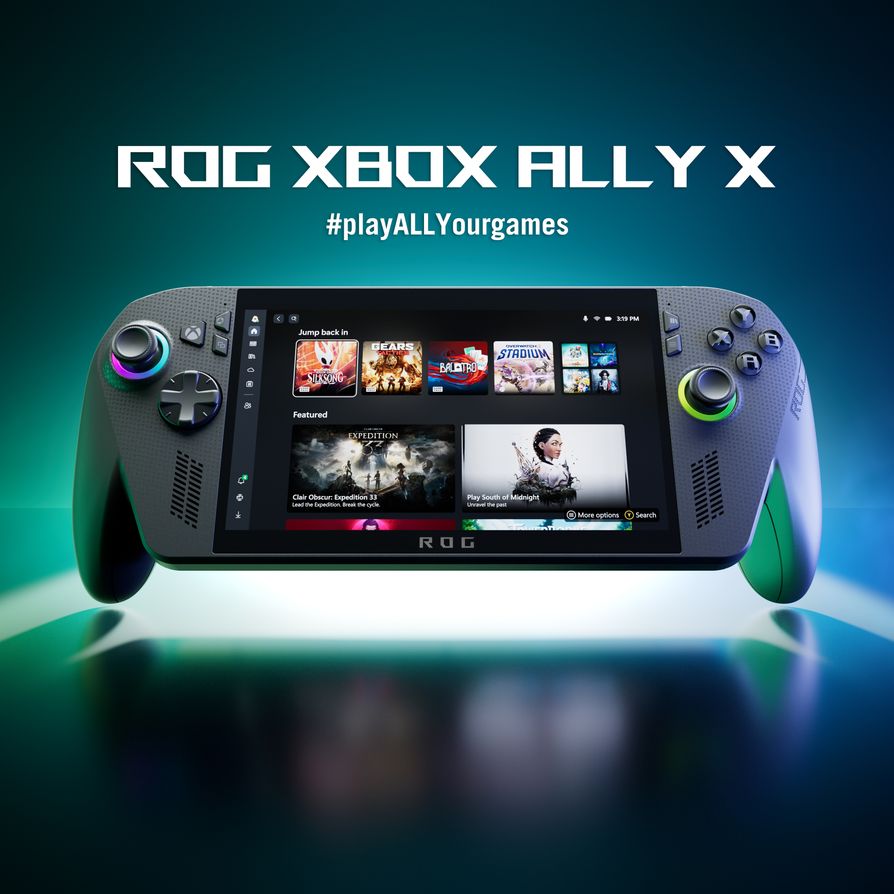
It's still a surprise that the "console experience" now comes from a Windows Start menu. But that's what Xbox Mode is: a console-style shell Microsoft rolled out to Windows 11 in April 2026, and on the ROG Xbox Ally and Ally X it's the thing that finally makes docking to a TV feel like slotting in a console instead of babysitting a tiny desktop with a controller.
The hardware side hasn't changed — it's still a Windows handheld with a USB-C port. What changed is that Windows now knows what to do with a TV, a controller, and an idle desktop once you plug in. Here's how to actually set the living-room version of this thing up, with a real parts list.
What you need
You don't need much beyond what most handheld owners already have lying around, but don't skip the dock — a bare USB-C-to-HDMI cable will get video to the TV but won't give you charging headroom or extra ports, and you'll be babysitting battery drain mid-session.
- ROG Xbox Ally or Ally X — if you're still shopping, the standard Ally has been dipping to $499.99 recently, worth checking before you pay full price. Whichever one you've got, update it to the latest Windows 11 build (Settings > Windows Update) and the latest Armoury Crate/ROG software — Xbox Mode and the docking improvements shipped as part of the April 2026 update, and older firmware won't auto-switch displays correctly.
- A USB-C docking station rated for 100W PD passthrough, 4K/120Hz HDMI, and at least one extra USB-A port. The JSAUX and TanReginal 6-in-1 docks built specifically for the ROG Ally/Xbox Ally line are the ones I'd point a reader to — HDMI 4K@120Hz out, Gigabit Ethernet, dual USB-A 3.2 ports, and 100W PD charge-through so the dock powers the handheld instead of draining it. Expect to pay roughly $40-70 depending on port count.
- A short, high-quality HDMI 2.1 cable if your dock's built-in cable is under 3 feet — you'll want reach to the TV without the dock hanging off the back of it.
- A wired Ethernet cable if your TV cabinet is anywhere near your router. Docked play is when you'll actually notice a shaky Wi-Fi connection, especially streaming game installs.
- An Xbox Wireless Controller (or any Bluetooth controller you're used to). The Ally's built-in controls work fine for handheld play, but for a couch setup you want a proper controller with Xbox Wireless range and rumble, not Bluetooth-only stick-on controls fighting the TV's distance.
- Optional: a controller charging dock or stand near the couch, and an HDMI-ARC-capable TV input if you want sound routed through a soundbar rather than the TV speakers.
Setting up Xbox Mode on the ROG Xbox Ally when docked
- Update first, dock second. Run Windows Update and the ROG/Armoury Crate app update before you touch the dock. Xbox Mode and the auto-display-switch behavior are tied to this specific update; docking on an older build just gets you a scaled-up desktop with tiny icons.
- Plug the dock into the TV and the Ally into the dock. With the current build, connecting to an external display now switches video output to the TV automatically and turns the handheld's own screen off — you don't need to dig into Windows display settings or touch a tiny on-screen toggle anymore. That was the single biggest annoyance before this update.
- Let the TV negotiate its game settings. If you've got a recent Samsung or LG set, docking now triggers features like Samsung's Auto Game Mode or ALLM (auto low-latency mode) automatically — worth confirming in the TV's picture menu the first time so you know it actually kicked in, since a stuck "Movie" picture mode will add real input lag.
- Pair or reconnect your controller before you sit down — Xbox Wireless controllers that were previously paired to the Ally's own controls should reconnect automatically once you're on the dock; new controllers pair through the same Bluetooth/Xbox Wireless flow as any other Xbox device.
- Turn on Auto Super Resolution for docked play, if your Ally X supports it (it's an Xbox Insider preview feature as of this writing). It's an AI upscaler that targets roughly 1440p-equivalent detail on a big screen without tanking frame rate — toggle it through Game Bar (Xbox button > Game Bar > Auto SR) rather than digging through Settings.
The living-room UI, and what it actually suppresses
The point of Xbox Mode isn't a new launcher skin — it's that when it's active, Windows suppresses background processes and desktop clutter to protect frame rate, which Microsoft claims performs better than just running the Xbox app on a normal desktop. Practically, that means: no update popups mid-boss-fight, no OneDrive sync notification stealing focus, no taskbar to accidentally fat-finger with a thumbstick. Your library and recently played titles sit front and center, navigable entirely with a controller — d-pad or stick to move, A to select, Xbox button to jump back to the shell mid-game.
It's not a full Quick Resume like a console — you're still on Windows underneath, so a cold boot into a game is still a cold boot. What it buys you is the removal of every "wait, where's my mouse" moment that used to make docked handheld PCs feel like a compromise.
Budget alternatives and notes
If you don't want to spend on a dedicated dock, a basic $15-20 USB-C-to-HDMI adapter works for video, but plan on plugging a separate charger into the Ally's second USB-C port (Ally X has two) since most cheap adapters don't pass enough power through to sustain a charge under gaming load. And if your TV isn't a recent Samsung or LG, you'll still get the auto display-switch and Xbox Mode shell — you just won't get the automatic ALLM/Game Mode handshake, so go flip that on manually in the TV's picture settings once and leave it.
Total realistic spend for a proper setup: $50-90 for a good dock, plus whatever you're already spending on a controller you probably own. That's a fraction of a console, on hardware that already does everything a gaming PC does when you're not on the couch.